Subscriptions and Selling Plans
Last updated: June 24, 2024
Replo supports interacting with Shopify products that support subscription selling plans (e.g. products that ship every month, which can be purchased with a discount).
Subscription Apps
Replo integrates with all apps on Shopify that provide subscription selling plan data, including Recharge, Smartrr, Skio, Stay.ai (formerly Retextion), Awtomic, Prive, Loop, Seal, Ordergroove, and more.
Adding a Subscription Product to the cart
Using Interactions, a subscription selling plan can be added to the cart. To do this:
Select the button or other component that you want to have the user click to add a subscription plan to the cart.
On the right side of the editor under Interactions, find On Click, then click the plus button.
Select Add Product To Cart and select the product which has been configured with a subscription selling plan through your subscriptions app.
Replo will automatically understand that this product can be sold as a subscription, and show a dropdown to select the selling plan. You have a few options of how to proceed, depending on what you're trying to do:
Manually set a selling plan that is applied to every add-to-cart interaction for this button (for a one time purchase, leave the selection blank).
If you are using the Selling Plan List and Selling Plan Dropdown component to allow a user to select their selling plan, then click the dynamic data button here in the add-to-cart interaction to grab the user's "Selected Selling Plan".
Alternatively, if you are using a third-party widget embed to allow a user to select a selling plan (like the ReCharge component), you can turn on the button toggle labeled "Allow third-party embeds to override selling plan".
Click save to save the interaction.
Using dynamic Product Variant selection
You can use Replo's built-in Variant List component to allow the your customers to select dynamic variants from your Shopify product listings, while still allowing selection of a subscription selling plan. To learn more, see Dynamic Variants with Subscription Selling Plans.
Allowing dynamic selection of Subscription Selling Plans
You can use Replo's built-in components to allow visitors to your store to select which subscription selling plan they want to purchase. See Selling Plan List and Selling Plan Dropdown for more info.
Variant-specific Selling Plans
Some Selling Plans only apply to a single variant within a product - for example, you might not sell one size of your product as a subscription.
In the Replo Editor, you'll see information about your Selling Plan selection with respect to variant compatibility, as a tooltip wherever you select the selling plan:
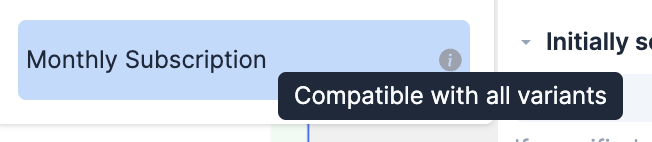
If you notice that the page is not referencing your intended Selling Plan selection, take a look at how you have configured the component - it's possible that your selected variant and selling plan are not compatible.
Allowing Third-party apps to override selling plan selections
Certain apps, like Seal Subscriptions, embed code into your Shopify store by default in order to allow automatic selection of subscription selling plans. For these apps, make sure to toggle on the toggle for allowing third-party apps to override the selected selling plan:
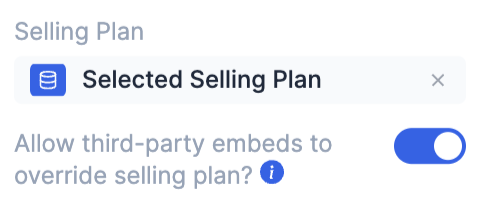
As long as this toggle is on, Replo will always defer to the third-party app to select the selling plan. This means that Selling Plan List and Selling Plan Dropdown components might not work correctly, since Replo relies on the third-party app to provide an interface for selecting whether one-time purchase or a subscription selling plan is selected.
If you want to use Selling Plan List and Selling Plan Dropdown components to enable selection, you can toggle off the "Allow third-party embeds to override selling plan" toggle.