Afterpay
Last updated: June 18, 2025
Shopify merchants love Afterpay as it helps them increase AOV and sales. With Afterpay merchants can offer customers the option to purchase what they want, and pay over 4 or 6 weeks — with no surprises, and no fees when paid on time. Afterpay works with the pages you build on Replo via a Liquid component embed.
To begin, you need to add Afterpay to your Shopify store (detailed guide for doing so here).
To configure Afterpay on Replo pages:
The Afterpay widget is typically inserted inside a buy box just below the product price
Open the Replo page you want to insert the widget
Drag a Liquid component into the page ensuring that you're placing it within a Product component.
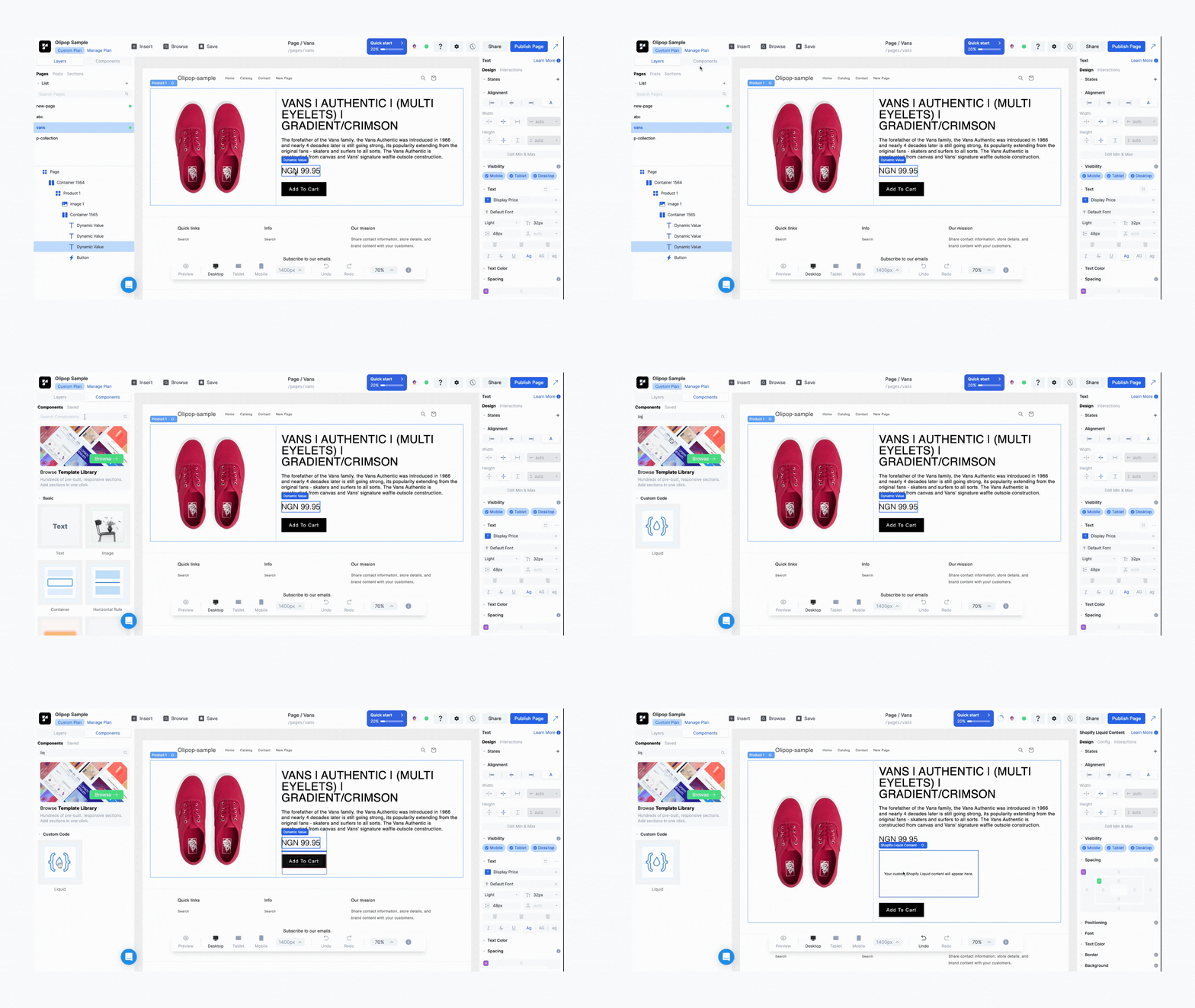
Navigate to the Liquid components config tag and click Launch Code Editor and paste below code into the editor.
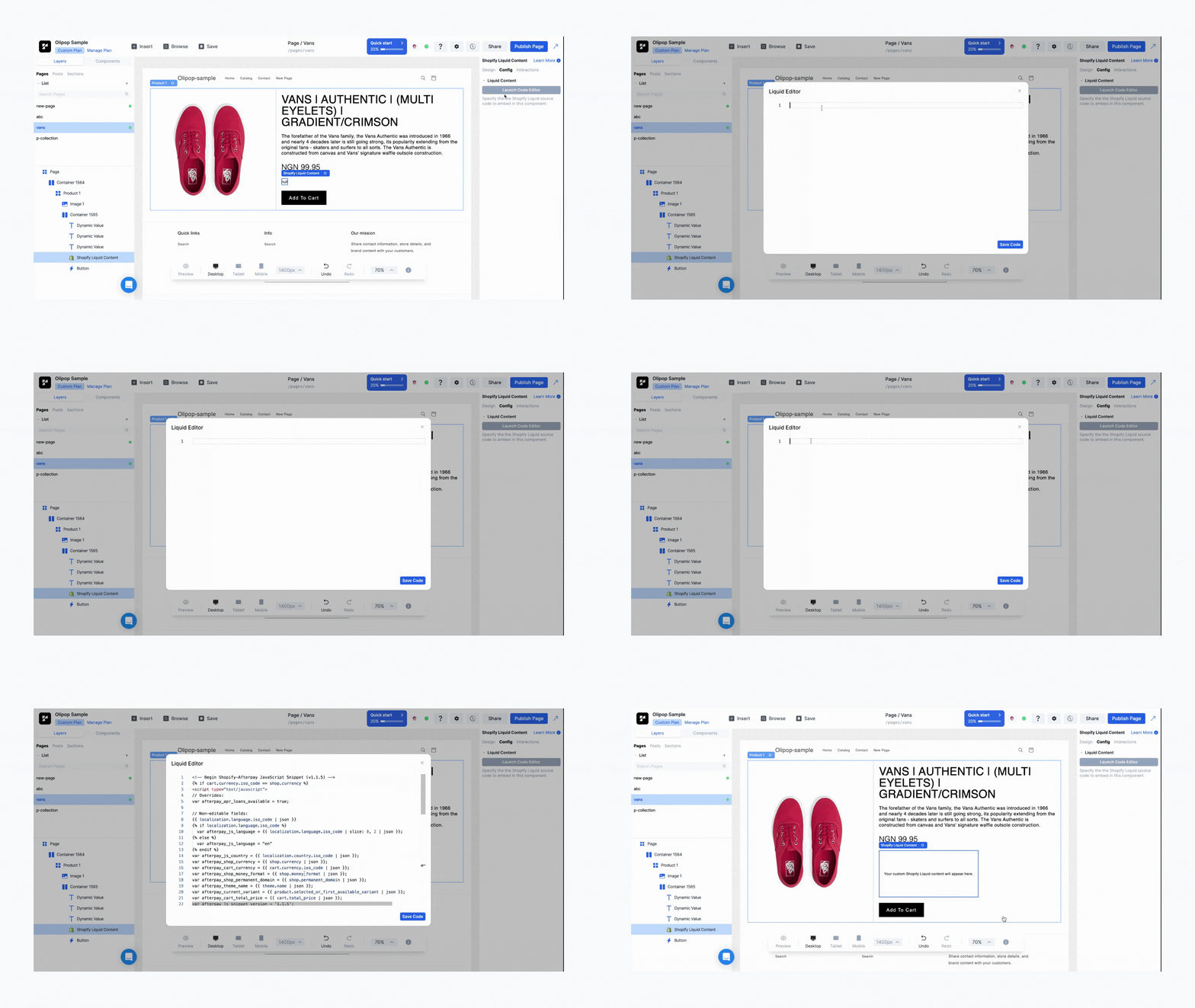
Click Save Code and publish the page.
The Afterpay logo and widget will appear on your Replo page.
Afterpay Code Snippet
<!-- Begin Shopify-Afterpay JavaScript Snippet (v1.32.12) -->
<script type="text/javascript">
  // Overrides:
  // var afterpay_msg_size = 'sm';  // Can be 'xs', 'sm', 'md' or 'lg'.
  // var afterpay_bold_amount = true;
  // var afterpay_logo_theme = 'colour';  // Can be 'colour', 'black' or 'white'.
  // var afterpay_modal_open_icon = true;
  // var afterpay_hide_upper_limit = false;
  // var afterpay_hide_lower_limit = true;
  // var afterpay_show_if_outside_limits = true;

  // var afterpay_product_integration_enabled = true;
  // var afterpay_product_selector = '#product-price-selector';
  // var afterpay_variable_price_fallback = false;
  // var afterpay_variable_price_fallback_selector = '';
  // var afterpay_variable_price_fallback_method = 'mutation';  // Can be 'mutation' or 'interval'.

  // var afterpay_cart_integration_enabled = true;
  // var afterpay_cart_static_selector = '#cart-subtotal-selector';
  // var afterpay_variable_subtotal_fallback = false;
  // var afterpay_variable_subtotal_fallback_selector = '';
  // var afterpay_variable_subtotal_fallback_method = 'mutation'; // Can be 'mutation' or 'interval'.

  // var afterpay_dynamic_cart_integration_enabled = false;
  // var afterpay_dynamic_cart_selector = '.cart-drawer__footer .totals';
  // var afterpay_dynamic_cart_observer_target = '#CartDrawer';

  // var afterpay_footer_logo_enabled = true;
  // var afterpay_footer_logo_format = 'icon';  // Can be 'icon', 'stacked' or 'logo'.
  // var afterpay_footer_logo_theme = 'colour'; // Can be 'colour', 'black' or 'white'.
  // var afterpay_footer_logo_background = 'border';  // Can be 'border' or 'transparent'.
  // var afterpay_footer_logo_container = 'footer ul.payment-icons';
  // var afterpay_footer_logo_template = '<li class="payment-icon"><object data="{logo_path}" type="image/svg+xml"></object></li>';

  // Non-editable fields:
  var afterpay_js_language = {{ localization.language.iso_code | slice: 0, 2 | json }};
  var afterpay_js_country = {{ localization.country.iso_code | json }};
  var afterpay_shop_currency = {{ shop.currency | json }};
  var afterpay_cart_currency = {{ cart.currency.iso_code | json }};
  var afterpay_shop_money_format = {{ shop.money_format | json }};
  var afterpay_shop_permanent_domain = {{ shop.permanent_domain | json }};
  var afterpay_theme_name = {{ theme.name | json }};
  var afterpay_product = {{ product | json }};
  var afterpay_product_collections = {{ product.collections | map: 'title' | join: ',' | json }};
  var afterpay_current_variant = {{ product.selected_or_first_available_variant | json }};
  var afterpay_cart_total_price = {{ cart.total_price | json }};
  var afterpay_cart_skus = {{cart.items | map: 'sku' | join: ',' | json }};
  var afterpay_cart_collections = {{cart.items | map: 'product' | map: 'collections' | map: 'title' | uniq | join: ',' | json }};
  var afterpay_js_snippet_version = '1.2.1';
  </script>
  <div id="afterpay"></div>
  <script async type="text/javascript" src="https://js.afterpay.com/afterpay-1.32.12.js"></script>


  <script>
    window.addEventListener('Afterpay.ready', function() {
      Afterpay.createPlacements({
        targetSelector: '#afterpay',
        attributes: {
          currency: Afterpay.currency.USD,
          amount: {{ product.selected_or_first_available_variant.price | divided_by: 100 }},
          amountSelector: '#afterpay',
          size: Afterpay.size.SM,
          mpid: {{ shop.permanent_domain | json }}
        }
      });
    });
  </script>

  <!-- End Shopify-Afterpay JavaScript Snippet (v1.32.12) -->
Troubleshooting
If your Afterpay snippet isn't displaying correctly on your Replo page, make sure of the following:
You've copy/pasted the exact content above into a 📄 Custom HTML and Liquid Liquid component. Make sure you're using a Liquid component, not an HTML component.
You haven't followed the instructions at https://developers.afterpay.com/docs/api/platforms/shopify/afterpay-site-messaging - if you follow these instructions and add the Afterpay javascript to your theme.liquid file, it will conflict with the Replo component and sometimes cause the Afterpay messaging not to show.