My sticky element isn't sticking
Last updated: April 1, 2025
Sticky and fixed elements will not behave correctly in the Replo editor, but will work on live pages.
So your container or header position is set to sticky, but it is not sticking? The most common reason is a CSS rule settingoverflow: hidden, overflow: auto, or overflow: scroll to specific elements on your Shopify theme. This is explained in somewhat more detail in this article.
Please note that sticky (position: sticky) and fixed (position: fixed) elements behave differently in the Replo editor compared to a live page.
Sticky and Fixed may not work in your Replo editor but will be working fine on the live page or generated preview page.
If you have a sticky or fixed element which is not working on live pages or generated previews you can follow the guidance below, and if you're still experiencing issues please contact our support team.
How to fix your sticky element issue
Method 1: Remove CSS rule from Shopify Theme
You or your team would have to remove the offending overflow: hidden, overflow: auto, or overflow: scrollrule from your Shopify Theme.
Method 2: Manually add CSS rule (via HTML tag) to Replo pages with sticky elements
You could add the custom HTML tag generated from the JS script output outlined below. You would have to do this for every page you create in Replo with sticky elements - here's how to add custom CSS rule
How to use the Replo provided script to identify theme CSS issues
At the bottom of this page, you will find a JS script that you can download and run in the browser console.
How to use the JavaScript file:
Open Replo page that has the sticky behavior issue
Copy the JS script below and Run it in your browser's JS console (command+option+J on Mac)
This file will return four main things:
Sticky Replo elements: Replo elements that have
position: stickyOffending Elements: Any parent/ancestor elements that have offending CSS overflow rules (
overflow: hidden,overflow: auto, oroverflow: scroll)HTML Script for you to add into your Replo page with a custom HTML element or into the Page Settings > Advance > Custom Head tag (for Method 2 above)
Link to CSS file where overflow setting was found (for Method 1 above)
If your Shopify theme is not the problem, the console will return this
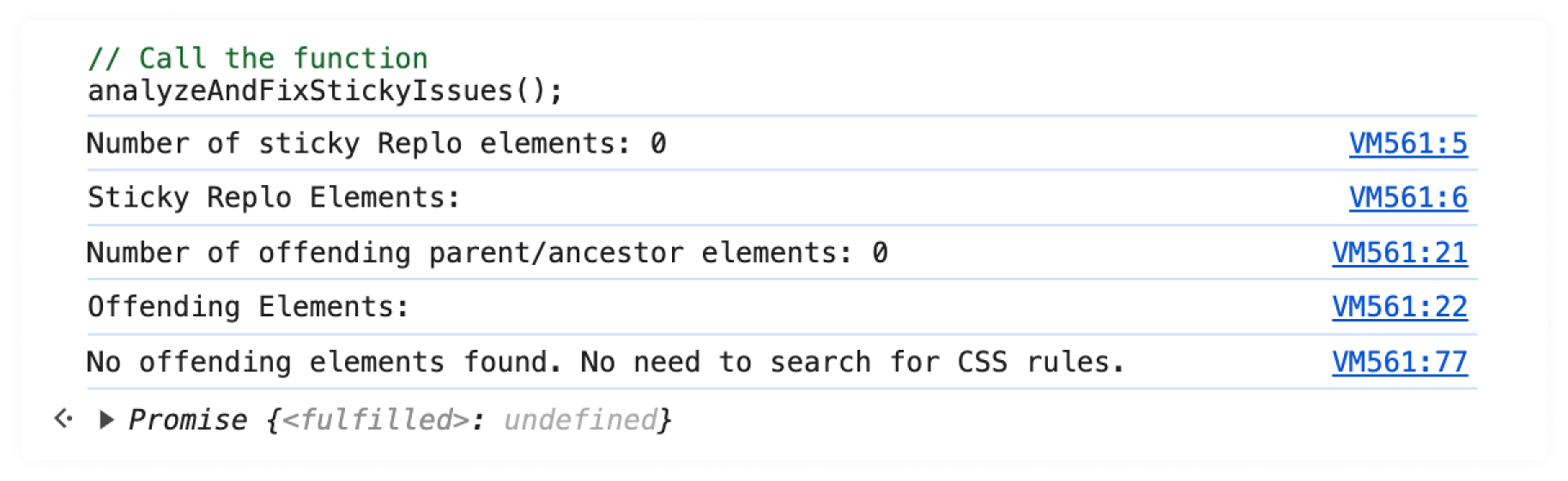
The main thing to note is that there are 0 offending parent/ancestor elements.
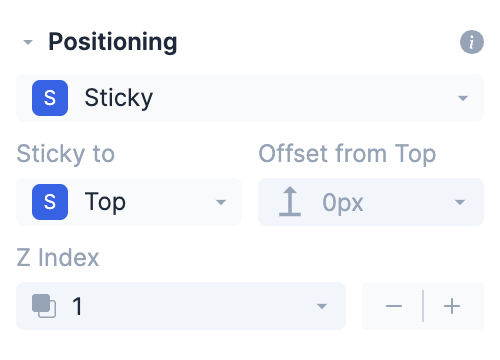
In this case, double-check that the position of elements that you want sticky are set to sticky to top
JS Script for Browser Console
async function analyzeAndFixStickyIssues() {
const reploElements = document.querySelectorAll('[data-rid]');
const reploStickyElements = Array.from(reploElements).filter(el => getComputedStyle(el).position === 'sticky');

console.log(`Number of sticky Replo elements: ${reploStickyElements.length}`);
console.log('Sticky Replo Elements:', ...reploStickyElements);

const offendingParents = new Set();

reploStickyElements.forEach(element => {
let parent = element.parentElement;
while (parent) {
const hasOverflow = getComputedStyle(parent).overflow;
if (hasOverflow !== 'visible') {
offendingParents.add(parent);
}
parent = parent.parentElement;
}
});

console.log(`Number of offending parent/ancestor elements: ${offendingParents.size}`);
console.log('Offending Elements:', ...offendingParents);

if (offendingParents.size > 0) {
const selectors = Array.from(offendingParents).map(el => {
return el.id ? `#${el.id}` : `.${el.className.split(' ').join('.')}`;
}).join(', ');

console.log(`
To fix offending elements, add a Custom HTML component to the page with this html:
<style>
${selectors} {
overflow: visible !important;
}
</style>
`);

// Check external stylesheets and <style> tags
const links = document.querySelectorAll('link[rel="stylesheet"]');
let foundRule = false;

for (let link of links) {
try {
const response = await fetch(link.href);
if (response.ok) {
const cssText = await response.text();
const regex = new RegExp(`(${selectors}\\s*{[^}]*overflow:[^}]*})`, 'g');
const matches = cssText.match(regex);
if (matches && matches.length) {
console.log(`Found rules in ${link.href}:`);
matches.forEach(match => console.log(match));
foundRule = true;
}
}
} catch (error) {
console.error(`Error fetching ${link.href}:`, error);
}
}

// Check <style> tags in the document
const styleTags = document.querySelectorAll('style');
styleTags.forEach((tag, index) => {
const cssText = tag.textContent;
const regex = new RegExp(`(${selectors}\\s*{[^}]*overflow:[^}]*})`, 'g');
const matches = cssText.match(regex);
if (matches && matches.length) {
console.log(`Found rules in page level HTML (style tag index ${index}):`);
matches.forEach(match => console.log(match));
foundRule = true;
}
});

if (!foundRule) {
console.log('No specific overflow rules found in any loaded CSS or style tags for the offending elements.');
}
} else {
console.log('No offending elements found. No need to search for CSS rules.');
}
}

// Call the function
analyzeAndFixStickyIssues();