Countdown Timer
Last updated: March 30, 2025
A Countdown Timer is a component that allows you to add a real-time countdown to your Replo page.
To Add a Countdown Timer:
Navigate to the page you want to add a Countdown Timer to in the editor.
On the left side of the editor, click the "Components" toggle, then search for "Countdown Timer"
Drag the Countdown Timer into the page and customize the design of the countdown timer to match your store's branding.
Configuring a Countdown Timer
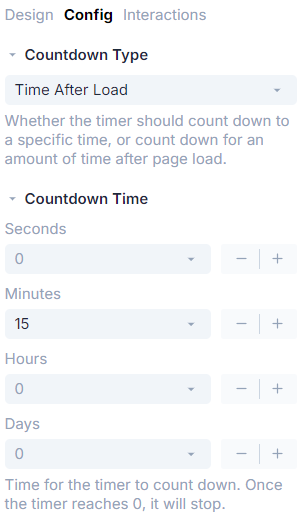
There are two types of countdown timers supported by Replo. You can choose which type of timer you'd like yours to be from the "Config" panel of your component.

Specific Time
This timer will countdown to a specific time you enter in the "Config" panel. This is commonly used to countdown to the end of a sale, or the launch of a pre-order.
Time After Load
This timer will count from a value you enter in the "Config" panel starting at the time the page loads. This is commonly used to let a customer know a particular offer or sale is time limited.
Using Dynamic Data with Countdown Timers
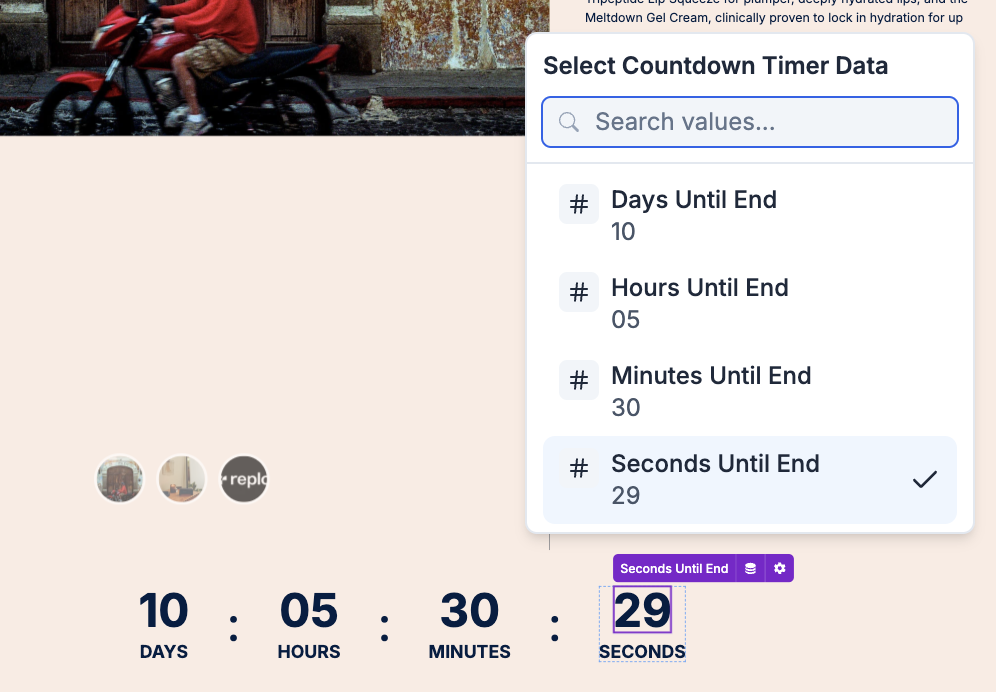
Inside a Countdown Timer, Replo's Dynamic Data system allows you to reference the number of days, minutes, seconds, etc.
To set a Text component to display Days, Hours, Minutes, Seconds until the countdown's end:
Select the Text component you want to edit - it will be purple.
Select the Dynamic Data Icon

Select "Seconds Until End", "Hours Until End", etc from the dynamic data sources