Replo A/B Testing FAQs
Last updated: January 28, 2026
How much does Replo A/B Testing cost?
A/B Testing is available on any paid tier for Replo. Different tiers include a specific number of A/B Testing Sessions, after which an upgrade may be necessary. Below are the respective limits for each tier:
Plan | Starter | Pro |
Monthly Cost | $119 | $599 |
A/B Tests | 100K sessions/month included, $1.50 / 1k sessions after 100K | 500K sessions/month included, $1.00 / 1k sessions after 500K |
What is an A/B Testing Session?
An A/B Testing session represents a single visit to the split test link, and charges are based on the amount of traffic a test receives. The only time Replo considers an A/B testing session is when a visitor comes into your site via a Replo A/B Testing link - normal visits to your site from other sources don't count against these sessions.
What is the difference between a Session and a Visitor? Why do we charge for Sessions versus Visitors?
As defined by Replo, a Session begins when a site is initially visited and concludes after 30 minutes of inactivity.
A Visitor, conversely, represents a unique customer who could return to the site multiple times. For example, one visitor might visit a site on their phone, then return 48 hours later, starting a new session. This would result in 1 visitor and 2 sessions.
Currently, Replo A/B testing is focused on Sessions, as properly reporting Visitors can be complex and error prone. A visitor-based model might be considered in the future.
See 📄 Replo Analytics Metric Definitionsfor more details on our metric definitions.
What happens when a customer reaches their session limit?
Currently, within Replo A/B Testing, you will not see a change when you've reached your limits.
For now, customer usage is monitored, and customers will receive an email from Replo's customer success team once they've reached their limit.
In the future, when limits are enforced in Replo automatically, customers will receive alerts on the A/B Testing and Billing tabs, as well as email notifications. Customers may choose between automatically upgrading or stopping experiment traffic.
Can customers view how many A/B Testing sessions have been used?
This is not available in the current release. However, we expect to introduce this feature soon.
Test Structure
I have an ad that’s already running traffic to a page, can I use that URL as an entry point for Replo A/B testing?
All Replo A/B tests use a specific URL as an entry point - visitors will vist this URL (via clicking on an ad, a search result, an email link, etc) and this URL will redirect the visitor to one of several A/B test variation URLs that you can set up within the A/B test configuration.
Currently, A/B tests can't be set up so that an existing URL functions as the entry point. This is because Replo needs to control these URLs, in order to route visitors to one variation or the other.
Example: You already have an ad running traffic to mystore.com/pages/campaign-1. It's not possible to re-use mystore.com/pages/campaign-1 as an entry point for a Replo A/B test, but you can set up a new A/B test in Replo and use the URL which Replo creates (which might include a custom subdomain like try.mystore.com).
Additionally, you can use mystore.com/pages/campaign-1 as one of the variation URLs of the A/B test, just not the entry point.
There are workarounds available so that you can reuse existing links in certain cases:
If the existing link is served via a Shopify site, you can set up a redirect within Shopify so that the link in Shopify redirects to the Replo A/B Testing link. Refer to this support document for guidance.
You can set up a link in Replo A/B testing, and then reuse that same testing link for subsequent A/B tests. This requires an initial swap, but afterward, the same link can be reused for future A/B tests.
Note that you can use any URL for a variation URL in a Replo A/B test - that is, the A and B can be any URL at all. It's only the entry point of the A/B test that has restrictions on what URL can be used.
Why can’t I use the same root domain as my Shopify store for the Replo A/B Testing entry point URL?
Replo’s A/B Testing structure is separate from Shopify, meaning domains connected to Shopify cannot be reused in Replo. We recommend creating a sub-domain like go.shopifyurl.com or try.shopifyurl.com for Replo A/B Testing.
What types of URLs can I use in my Test?
Replo A/B Testing allows you to split traffic between any URLs you choose. The web pages you use for testing do not need to be Replo pages or even part of your Shopify store.
For instance, you can set up a test to direct traffic between a landing page built in Replo and your Collections page that is not built in Replo. In this test, you will see all the associated metrics on the test's results page.
Please note that if you send traffic to URLs outside of your Shopify store, certain metrics such as Conversion Rate, Average Order Value (AOV), and Revenue per Session will not be available. To track these metrics accurately, we suggest using an external tool like GA4 along with specific UTM parameters.
What are Group Names for Split Links?
Group Names allow customers to customize experiment links without adding a custom domain.
How do you create Group Names?
Group Names can be set up on the A/B Testing Settings page. This will soon be integrated into the test creation process.
Can I re-use test links in Replo? (a.k.a. Forever Links)
Replo provides the benefit of link reuse for A/B Testing - a.k.a. Forever Links. Once an experiment has ended, the same link can be used for subsequent experiments without making additional changes.
This feature eliminates the hassle of frequent link replacements where it matters the most - in your ad sets.
What happens to UTM parameters in my A/B Testing Link?
Replo automatically preserves UTM parameters during redirects for A/B testing. Simply add your UTM parameters to your forever links OR your variation URLs and they'll get passed through the end links so you can track your forever through different channels.
A typical example of this is that Meta will generally automatically add UTM params to your ad (this exists in the Meta ad's settings), and Replo forever links will automatically pass any of these that are received from the Meta ad traffic.
Understanding Attribution Models in A/B Testing
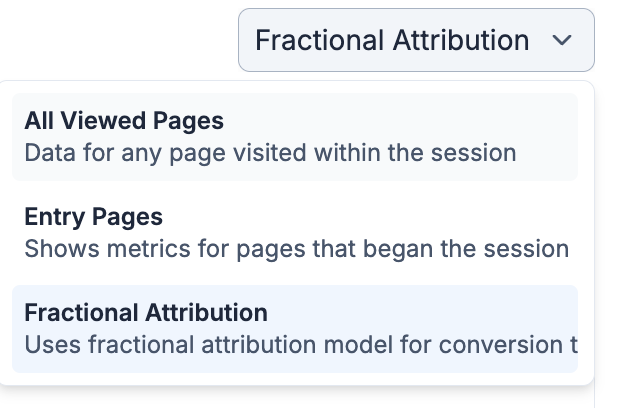
Replo now supports several attribution models for A/B Testing. The two main ones you should use are Entry Page and Fractional Attribution.
Use Entry Page Attribution if a redirect to the A/B testing forever link is going to START a session. Generally, this is best for when a forever link is used as the outbound link of a Meta (or other) ad.
Use Fractional Attribution when a shopping sessions has already started BEFORE a redirect happens to the forever link. This is usually best for intra-site A/B Tests, like putting the forever link in your stores navigation to test two different paths.
You can toggle between between attribution models in Replo’s A/B Test's Results page.
Frequently Asked Questions
Can I edit a test once it’s live?
You can edit some of the test content when it's live. The test name and description can be edited, but the split test URL and variants cannot.
Can I delete a test when it’s live?
A live test cannot be deleted directly. First, the test must be ended, and a new traffic destination must be selected.
Why am I not seeing the results of my A/B Test?
Ensure Replo Analytics is enabled to view results.
Replo Analytics must be activated for the desired domain.
What timezone is used for the results page for A/B Testing?
A/B Testing results use the browser’s time zone, which differs from Analytics data that operates on the timezone set in the Workspace settings.
Can you duplicate a test?
This functionality is not available yet, but it is on the roadmap for future updates.
What happens if I uninstall Replo when a test is still running?
If Replo is uninstalled while a test is running, data will stop being collected for any domains related to that Shopify Store. The test will continue to split traffic according to the test designation, but no more data will be reflected in the results.
How many custom domains can I have?
Replo allows you to have up to 5 custom domains for A/B testing. These domains will all be aliases of each other, and you can use these domains interchangeably - tests will be available from any of the domains you have connected.
If you have the need to add more custom domains, please reach out to Replo support from the in-app chat or email [email protected] so we can help you add more custom domains.
How can I delete a custom domain?
At the moment, deleting a custom domain isn't possible via the Replo dashboard. For this process, please reach out to Replo support from the in-app chat or email [email protected] so we can help you delete the custom domain.